

Most people get average answers from AI because the question is vague. A fill-in-the-blank prompt fixes that. It gives you a proven structure, and you only add the details that are yours. Here is how it works and how to use it in about a minute.
What a fill-in-the-blank prompt is
It is a ready-made prompt with a few marked gaps. Each gap sits in square brackets, like [NICHE], [PRODUCT] or [AUDIENCE]. The words around the gaps already tell the AI what to produce, how many ideas to give, and how to rank them. You supply the specifics.
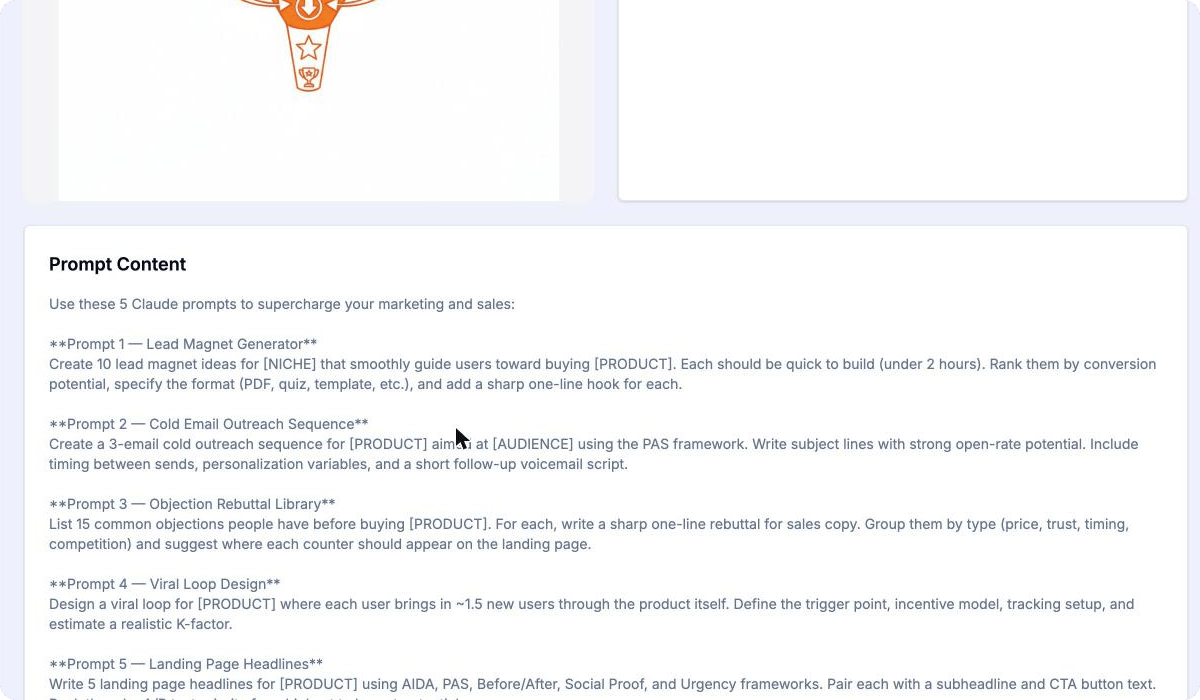
Here is a real example from the PromptiFex library, the Lead Magnet Generator:
Create 10 lead magnet ideas for [NICHE] that smoothly guide users toward buying [PRODUCT]. Each should be quick to build (under 2 hours). Rank them by conversion potential, specify the format (PDF, quiz, template, etc.), and add a sharp one-line hook for each.
Fill in [NICHE] with "yoga teachers" and [PRODUCT] with "a 4-week online course", and the AI knows exactly what you want. Other prompts in the library use blanks such as [AUDIENCE] in the same way.
This works because the hard part is already done. Someone has thought about which details an AI needs to give a useful answer, such as the goal, the format and the limits. The blanks make sure you only type what changes from one use to the next.
Use one in three steps
You do not need to write anything from scratch. The whole routine takes three steps.
Pick a prompt
Browse the library by category or search for your task. Open a prompt to read the full text.
Replace the blanks
Swap each [BLANK] for your own details, such as your niche, your product or your audience.
Paste and send
Copy the finished prompt and paste it into ChatGPT, Claude or Gemini. Edit the answer as you like.
The same prompt works in any AI chat, because it is just text. Gemini and other chats are paste-only, so you copy the prompt and drop it into the message box yourself.
A good habit is to read the whole prompt once before you fill it in. Check that every blank has an answer, and delete any line that does not fit your situation. A prompt is a starting point, so changing a word or two is fine.
Save the prompts you reuse
Some prompts earn a permanent spot in your week. When you find one, save it to a package, which is your own collection of prompts. You might keep one package for marketing, another for studying, and a third for client work.
Packages sync across the web app, iOS and Android. A prompt you save on your laptop is waiting on your phone later, so you can fill in the blanks wherever you are.
Sharpen prompts inside ChatGPT and Claude
If you work in ChatGPT or Claude all day, the PromptiFex Chrome extension adds a prompt enhancer right on the page. A floating button opens a small drawer, asks a few quick questions about what you need, then builds a structured prompt and places it in the chat box.
The enhancer works on ChatGPT and Claude only. Everywhere else, the copy-and-paste routine above does the job.
Whichever way you work, the idea stays the same. Start from a prompt that already works, add your own details, and spend your time on the answer instead of on the wording. Open the library, pick a prompt for something you need this week, and try it.